
Your trust, company, SMSF + personal finances in one app
Holdings brings your family trust, investment company and self-managed super fund into Wealthra alongside your personal accounts. See each structure on its own, your personal finances on their own, or everything together.
Holdings is in addition to portfolio and asset views, and all can work together for your structure needs.
- One login for every structure
- Private by default
- Read-only bank connections
- Web, iOS and Android
This page describes features in the Wealthra app. Where it mentions trusts, companies or super, it explains how the app works, not what you should do.
Built for finances that don’t fit in one name
For many Australians, money sits in more than one place: a personal account and a mortgage, a family trust that holds shares, a company that owns an investment property, an SMSF. Most finance apps only show the personal side, so the rest ends up in spreadsheets, broker logins and your accountant’s annual reports.
Holdings keeps each structure distinct, with the same budgets, reports and forecasts you use for your personal money.
Discretionary (family) trusts
Record the trustee, appointor and beneficiaries, and the accounts and assets the trust holds.
Unit trusts
Record unitholders with their percentage and a description of the units each holds.
Companies
Record directors and shareholders, the ACN and ABN, and the company’s accounts and assets.
Self-managed super funds
Record trustees and members, and keep the fund’s bank accounts and investments in their own view.
One app, three ways to see your money
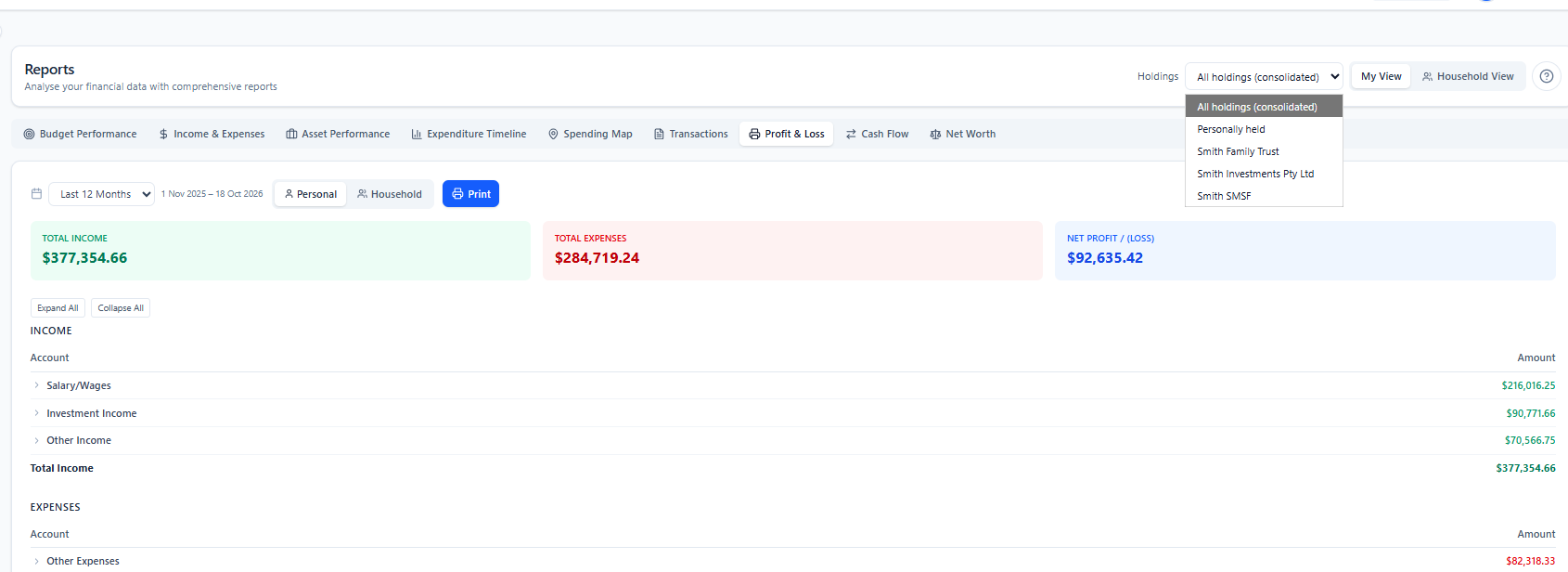
The Holdings selector changes what Wealthra shows across the dashboard, Accounts, Bank Connections, Assets, Budgets, Planning, Cash Flow and Reports. Transactions has its own Held by filter.
All holdings
Everything you and your structures hold, combined into one consolidated picture.
Personally held
Just the accounts and assets in your own name. Your personal finances, on their own.
One structure
A single trust, company or SMSF, with only its accounts, assets, budgets and activity.
Each total is named for what it is
Assets in your SMSF or family trust aren’t simply yours to spend, so Wealthra labels each view’s total differently.
| View | The total is called | What it includes |
|---|---|---|
| Personally held | Personal Net Worth | Accounts and assets held in your own name |
| One structure | Net Holdings | Accounts and assets held by that trust, company or SMSF |
| All holdings | Consolidated Net Holdings | Everything combined: a full picture, not a claim that it’s all personal wealth |
What Holdings does
A register of your structures
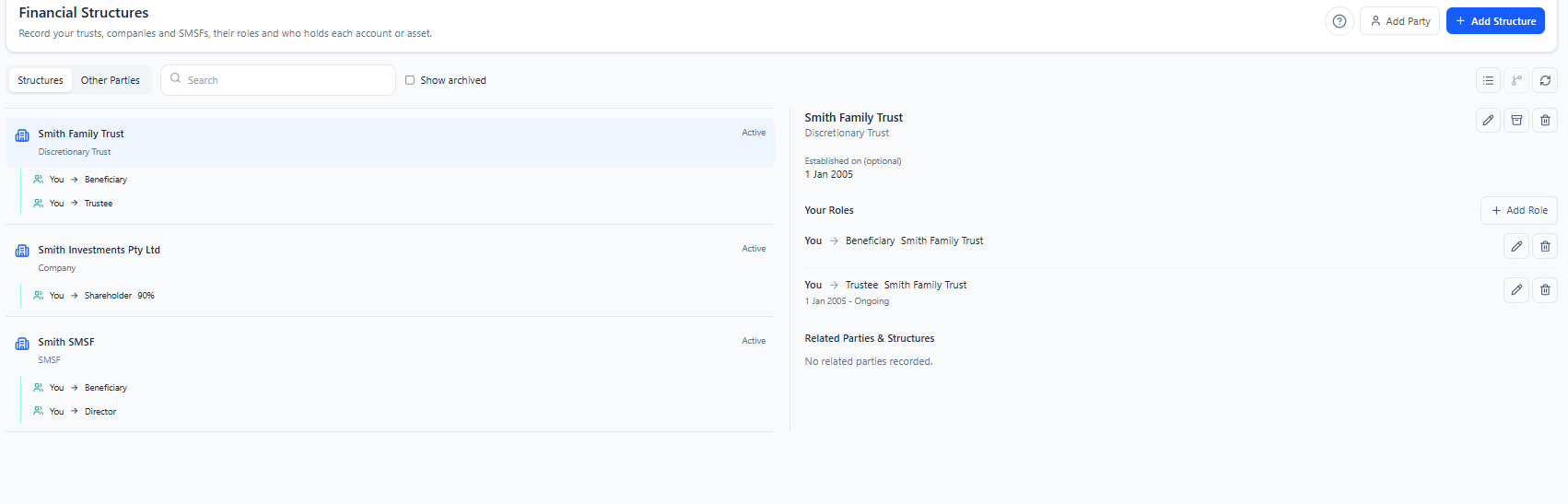
Add each trust, company or SMSF with its name, ABN, ACN for companies, the date it was set up and private notes. Mark it Active, Needs review or Archived, and restore an archived structure at any time.
People and roles
Record trustees, beneficiaries, appointors, directors, shareholders, unitholders and members, with start and end dates. A company can be recorded as corporate trustee of a trust. The relationship map shows how everyone connects.
“Held by” on every account
Set each balance-sheet account as personally held or held by a structure. Assets linked to an account take on the same holder, so a share portfolio in your name stays apart from one held by your SMSF.
History that stays accurate
Holder changes are dated and apply from today, so past figures don’t move. Correcting a mistake? Choose Apply to all history instead. Each transaction belongs to whoever held the account on the day it happened.
Budgets, goals and forecasts per holder
Assign budgets, project budgets and goals to a holder. Use the same category for different holders, such as property maintenance on your home and on the company’s investment property. A holder’s forecast only includes that holder’s balances, assets, budgets and debts.
Reports for each holding
View reports in total, for one holding, or by asset, such as each investment property. Printed statements show the holder in the header, and CSV exports note the view they came from, so figures you send your accountant are clearly labelled.
Transfers between structures
Reconcile Transfers finds likely matching pairs of transactions. You confirm each pair and can label it a contribution, distribution, loan, repayment or reimbursement. If one side changes, the pair is flagged for review.
Private by default
Only you see your structures. Household sharing is optional and read-only. Recording someone as a trustee, director or beneficiary doesn’t give them access to the app.
Set up in four steps
Add your structures. Open Financial Structures and add your trusts, companies and SMSF.
Record the people. Add your own roles, and anyone else connected to each structure.
Set “Held by”. Assign each relevant account, or connect new accounts for each structure through Open Banking.
Choose your view. Use the Holdings selector to see one structure, your personal finances, or everything.
Investor and Planner subscribers can book a free onboarding session with the Wealthra team for help with set-up.
What Holdings is, and what it isn’t
Holdings is for organising your finances by who holds them, seeing each part clearly, and planning with the right context. It isn’t entity accounting or compliance software, and it doesn’t replace your accountant or SMSF administrator.
Holdings does
- Keep each structure’s accounts, assets and activity distinct
- Show each structure, your personal finances, or everything together
- Record people, roles and percentages for your reference
- Label transfers between you and your structures
- Report by holding, with the holder shown on statements and exports
Holdings doesn’t
- Calculate trust distributions or beneficiary entitlements
- Calculate SMSF member balances
- Work out tax for any structure
- Track amounts owed between entities (loans receivable and payable)
- Allocate wealth based on the percentages you record
- Check ABNs and ACNs against official registers (it checks the format only)
Holdings is part of the Planner plan
Planner includes everything in Investor (shares, ETFs, crypto, super and property tracking) plus Holdings, financial goals, calculators and scenario forecasts up to 30 years.
Planner is currently available at the Investor price. Every plan includes a 14-day trial with bank connections, and no credit card is needed to start.
If you move off Planner, your structures, roles and holder history are kept. You need Planner again to use the holder views or change assignments.
Already on Planner? Open the app and add your first structure.
Common questions
What is Holdings in Wealthra?
Holdings lets you record who holds each account and asset: you personally, or a family trust, unit trust, company or SMSF. You can then view each holder on its own, your personal finances on their own, or everything together in one consolidated view.
Which structures can I add?
Discretionary (family) trusts, unit trusts, companies and self-managed super funds (SMSFs). For each one you can record a name, ABN, ACN for companies, establishment date and notes, plus the people and roles connected to it, such as trustee, director, shareholder, beneficiary, appointor, unitholder or member.
Which Wealthra plan includes Holdings?
Holdings is part of the Planner plan. If you move off Planner, your structures, roles and holder history are kept, and you need Planner again to use the holder views or change assignments. See pricing.
Do I need a separate login for my trust or SMSF?
No. Every structure sits inside your one Wealthra account. You mark each account as personally held or held by a structure, and switch views with the Holdings selector.
Can I see reports for just my SMSF, or just one investment property?
Yes. Reports can be viewed in total, for a single holding such as a trust, company or SMSF, or by asset, such as each investment property. Printed statements show the holder in the header, and CSV exports note the view they came from.
Does Wealthra do trust accounting, SMSF administration or tax returns?
No. Holdings is for organising and seeing your finances by holder. It doesn’t calculate trust distributions or beneficiary entitlements, SMSF member balances, tax, or amounts owed between entities, and it doesn’t replace your accountant or SMSF administrator. Ownership percentages you record are for your reference only.
How are transfers between my personal accounts and my trust shown?
Reconcile Transfers suggests matching pairs of transactions, and you confirm them, with an optional purpose such as a contribution, distribution, loan, repayment or reimbursement. In a single holder’s view, money moving to or from another holder is shown separately from income and spending. In the consolidated view, it’s treated as an internal transfer.
Can my partner see my structures?
Only if you choose. Structures are private by default. You can share them with your household, which gives read-only access to the structures, people and relationships. Adding someone as a trustee, director or beneficiary in Wealthra doesn’t give them access to the app. How Wealthra protects your data.
Related
See every structure in one place
Try Wealthra free for 14 days with bank connections. No credit card required.
Start your 14-day free trial