
Introducing Holdings: your trust, company, SMSF + personal finances in one app
Bring your family trust, investment company and SMSF into Wealthra alongside your personal finances. See each one on its own, or everything together.
On Friday we released a major upgrade to the Wealthra Planner plan. It’s called Holdings. You can now bring your family or other trusts, investment companies and self-managed super fund into Wealthra alongside your personal finances and see each one on its own or everything together.
This post describes features in the Wealthra app. Where it mentions trusts, companies or super, it explains how the app works, not what you should do.
We built Wealthra to manage your whole financial life in one place. For a lot of Australians, that means more than personal bank accounts and a mortgage. It can include a self-managed super fund, a family trust that holds shares, a company that owns an investment property, or a unit trust you’ve set up with family.
Once your money is spread across structures like these, one big total stops telling you as much. Money in your own name isn’t the same as money in your trust or your SMSF. Until now, most people have kept the personal side in one app and the rest in spreadsheets, broker logins and their accountant’s annual reports.
Holdings changes that. Business accounting has long tracked separate entities and separate profit centres within one set of books. To our knowledge, Wealthra is the first personal finance app to bring that idea to personal finance: one app, one login, with every structure you’re connected to kept distinct and still visible in one place.
One platform, three ways to see your money
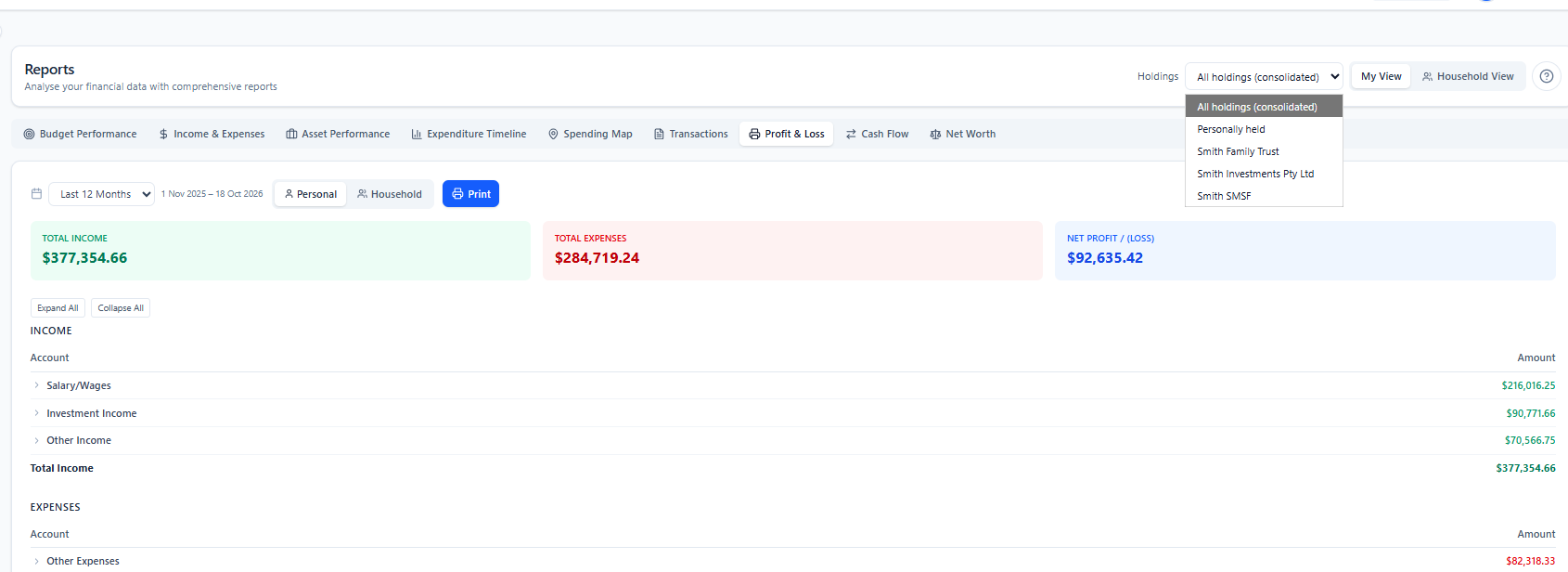
Holdings adds a selector that changes what every page in Wealthra can show.
- All holdings: Everything you and your structures hold, combined into one consolidated picture.
- Personally held: Just the accounts and assets in your own name. Your personal finances, on their own.
- One structure: A single trust, company or SMSF, with only its accounts, assets, budgets and activity.
The selector works across the dashboard, Accounts, Bank Connections, Assets, Budgets, Planning, Cash Flow and Reports. Transactions has its own Held by filter, so you can dig into the activity behind any number. The view you pick is saved in the page address, so you can bookmark your SMSF dashboard and go straight back to it.
Each view uses the right name for its total
A consolidated total isn’t the same as personal wealth. Assets in your SMSF or family trust aren’t simply yours to spend. So Wealthra labels each total for what it is:
| View | What the total is called | What it includes |
|---|---|---|
| Personally held | Personal Net Worth | Accounts and assets held in your own name |
| A single structure | Net Holdings | Accounts and assets held by that trust, company or SMSF |
| All holdings | Consolidated Net Holdings | Everything combined. A full picture, not a claim that it’s all personal wealth |
Set up your structures once
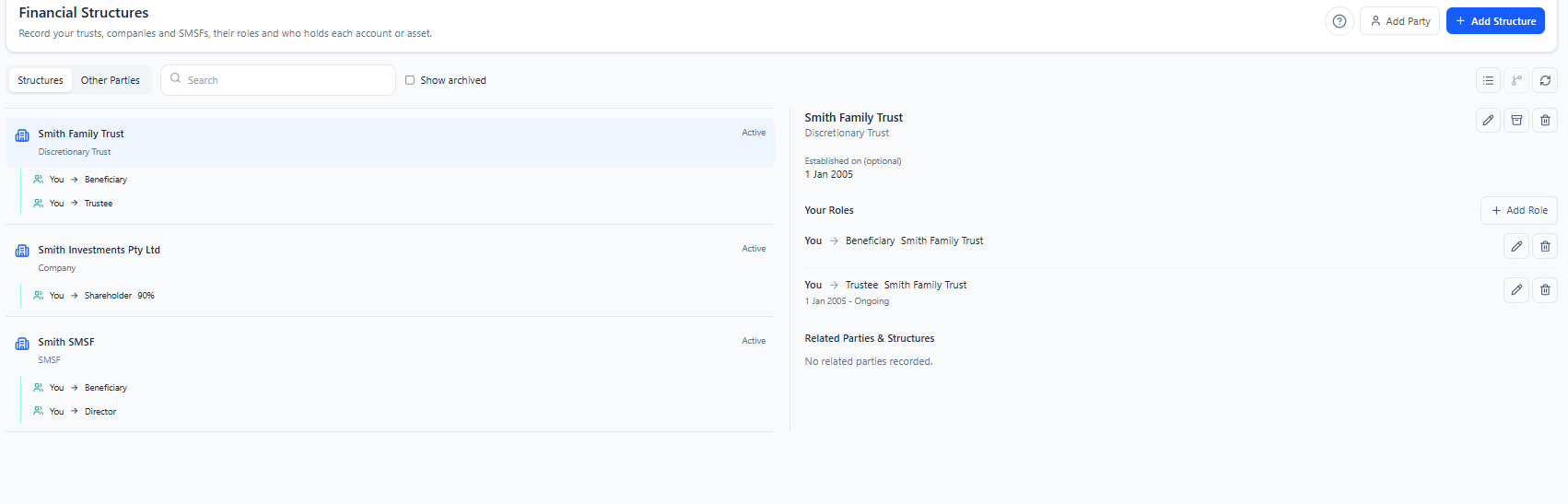
Holdings starts with the Financial Structures register. Add each structure you’re connected to:
- Discretionary (family) trusts
- Unit trusts
- Companies
- Self-managed super funds (SMSFs)
For each one, record a name, its ABN, an ACN for companies, the date it was set up and any notes. Mark it as Active, Needs review or Archived. Archived structures can be restored at any time.
Once the structure is created, you then assign the holding structure to relevant bank accounts, assets & liabilities. From this point your Wealthra platform can record and report on each structure or your overall position.
Record who does what
Structures come with people and roles. Wealthra lets you record your own roles without creating a separate profile for yourself, and add other people, or another structure, where it helps. A common example is a company acting as corporate trustee of a family trust.
Supported roles are trustee, beneficiary, appointor, director, shareholder, unitholder and member. Each relationship can have start and end dates and notes. For shareholders and unitholders, you can also note a percentage and a description of the shares or units it represents.
Switch to the relationship map to see how all your people and structures connect.
Tell Wealthra who holds each account
Every balance-sheet account now has a Held by field. Set it to personally held, or to one of your structures. Assets linked to an account take on the same holder automatically, so an account and the asset it funds always line up.
That’s how Wealthra tells a share portfolio in your own name apart from one held by your trust or your SMSF, all inside the one login.
History stays accurate
Holder assignments are dated. Change who holds an account and the change applies from today by default, so your past figures don’t move. If you’re correcting a mistake, choose Apply to all history instead.
Behind the scenes, each transaction belongs to whoever held the paying account on the day it happened, and your historical net worth uses the holder that applied on each date. Changing a holder is more than relabelling today’s balance.
Budget, plan and forecast for each structure
Budgets, project budgets and financial goals can each be assigned to a holder. You can use the same budget category for different holders, so “Property maintenance” for your own home and for the company’s investment property stay separate. Accounts linked to a budget or goal must have the same holder, which keeps personal targets and entity spending from mixing.
Forecasts for a single holder only include that holder’s balances, assets, budgets and debts. Scheduled transfers between holders count as money in or out, depending on which view you’re in.
Reports work the same way. Printed statements show the holder in the header, and CSV exports from Assets and Transaction Review note the view they came from. When you send figures to your accountant, it’s clear which entity they belong to.
Money moving between structures, made clear
Money often moves between you and your structures: a contribution to your SMSF, a distribution from the family trust, or a loan to the company. Reconcile Transfers finds likely matching pairs of transactions over a date range you choose. You confirm each pair, and can tag it with a purpose:
- Contribution
- Distribution
- Loan
- Repayment
- Reimbursement
Linked transactions take you straight to the other side of the movement. Pairs can be unlinked, and if one side is changed or deleted, Wealthra flags the pair for review.
Private by default, shared when you choose
- Your structures are private. Only you see them unless you decide otherwise.
- Household sharing is optional. Turn it on and your household member gets read-only access to your structures, people and relationships.
- Roles don’t grant access. Adding someone as a trustee, director or beneficiary in Wealthra doesn’t give them access to the app.
- Sharing and viewing are separate. Who can see your structures and which holder you’re looking at are two different controls.
Read more about how Wealthra protects your data.
What Holdings is, and what it isn’t
Holdings is for organising your finances by who holds them, seeing each part clearly, and planning with the right context. It isn’t entity accounting or compliance software, and it doesn’t replace your accountant or SMSF administrator.
In particular, Holdings doesn’t:
- calculate trust distributions or beneficiary entitlements
- calculate SMSF member balances
- work out tax for any structure
- track amounts owed between entities (loans receivable and payable)
- allocate wealth or confirm entitlements based on the ownership percentages you record. Those are for your reference.
- check ABNs and ACNs against the official registers. Wealthra checks the number is in a valid format only.
Get started
- Open Financial Structures in Wealthra and add your trusts, companies and SMSF.
- Add your roles and anyone else connected to each structure.
- Set the Held by field on each relevant account or set up new accounts for each holding.
- Use the Holdings selector to see the picture you need.
Common questions
What is Holdings in Wealthra?
Holdings lets you record who holds each account and asset: you personally, or a family trust, unit trust, company or SMSF. You can then view each holder on its own, your personal finances on their own, or everything together in one consolidated view.
Which types of structures can I add?
Discretionary (family) trusts, unit trusts, companies and self-managed super funds (SMSFs). For each one you can record a name, ABN, ACN for companies, establishment date and notes, plus the people and roles connected to it, such as trustee, director, shareholder, beneficiary, appointor, unitholder or member.
Which Wealthra plan includes Holdings?
Holdings is part of the Planner plan. If you move off Planner, your structures, roles and holder history are kept, and you’ll need Planner again to use the holder views or change assignments. Compare plans.
Do I need a separate login for my trust or SMSF?
No. Every structure sits inside your one Wealthra account. You mark each account as personally held or held by a structure, and switch views with the Holdings selector.
Does Wealthra do trust accounting, SMSF administration or tax returns?
No. Holdings is for organising and seeing your finances by holder. It doesn’t calculate trust distributions or beneficiary entitlements, SMSF member balances, tax, or amounts owed between entities, and it doesn’t replace your accountant or SMSF administrator. Ownership percentages you record are for your reference only.
How are transfers between my personal accounts and my trust shown?
Reconcile Transfers suggests matching pairs of transactions, and you confirm them, with an optional purpose such as a contribution, distribution, loan, repayment or reimbursement. In a single holder’s view, money moving to or from another holder is shown separately from income and spending. In the consolidated view, it’s treated as an internal transfer.
Can my partner see my structures?
Only if you choose. Structures are private by default. You can share them with your household, which gives read-only access to the structures, people and relationships. Adding someone as a trustee, director or beneficiary in Wealthra doesn’t give them access to the app.
Get Planner for the Investor price
For a limited time, you can upgrade to Planner, with Holdings included, for the same price as our Investor plan. Every plan includes a 14-day trial with bank connections. No card needed.
Try Planner nowAlready on Planner? Open the app and add your first structure.
More from Wealthra
This post explains how the Holdings features in the Wealthra app work. It is information only, not a recommendation about what you should do or how you should structure your finances.
Important: The information provided is factual and general educational information only. It is not financial, investment, tax or legal advice and must not be relied on as such. Wealthra Pty Ltd does not hold an Australian Financial Services Licence (AFSL) and does not provide financial product advice. This information does not take into account your personal objectives, financial situation or needs. Before making any financial decision, consider whether it is appropriate for your circumstances and seek advice from a licensed financial adviser, accountant or other qualified professional.