
Manage all your financial documents in Wealthra
Upload, snap or forward receipts, bills, super statements and contract notes. Wealthra reads them, makes them searchable and links them to your money.
You can manage all your financial documents in Wealthra, right next to the money they relate to. Upload it, take a photo of it or forward the email, and Wealthra reads it, makes it searchable and files it next to the transaction, bill, account or asset it belongs to.
This post describes features in the Wealthra app. Where it mentions tax, super or investments, it explains how the app works, not what you should do.
Your bank accounts, cards, loans, super and shares already come together in Wealthra. But the paperwork behind them usually doesn't. The receipt for the new fridge is in a kitchen drawer. The power bill is somewhere in your inbox. Your super statement is a PDF you downloaded once and never opened again. The contract note for your last share trade is buried under three newsletters.
Documents bring the rest of your financial life into one place. The numbers and the paperwork that explains them sit together.
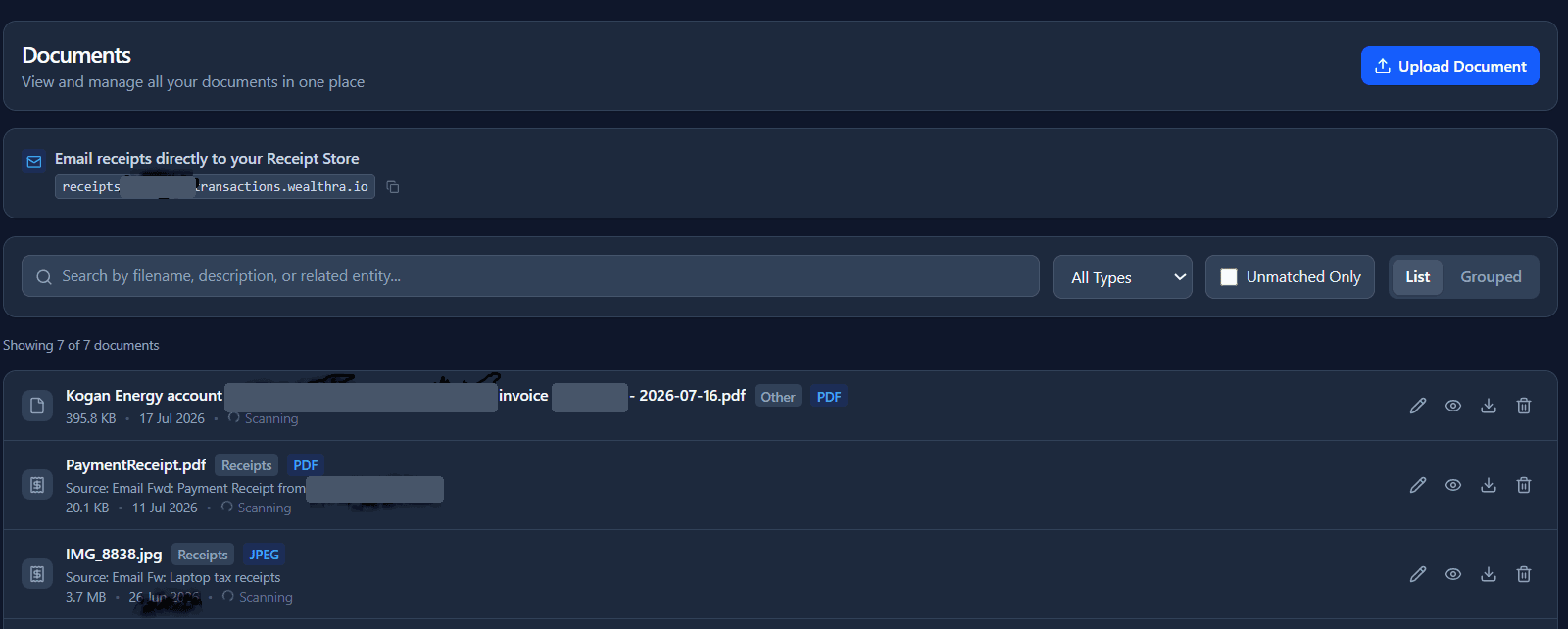
Three ways in, one place to land
However a document reaches you, there's a way to get it into Wealthra.
- Upload it: Drag and drop a file, or pick one from your computer or phone.
- Snap it: Take a photo of a paper receipt, payslip or letter in the Wealthra app on iOS or Android.
- Forward it: Send the email to your private Wealthra address and it’s filed for you.
All three end up in the same place. Wealthra reads the text, works out what kind of document it is, and links it to the right part of your finances. Wealthra accepts PDFs and photos (JPEG, PNG, WebP and GIF), and super statements can also be uploaded as CSV files. See how document management works.
Forward it and forget it
Most financial paperwork arrives by email now. So instead of downloading, renaming and filing each one, you can forward it to Wealthra.
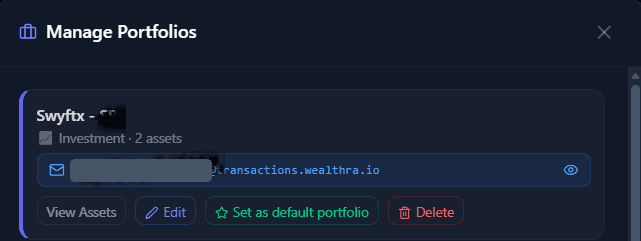
Every Wealthra user gets a set of private forwarding addresses, one for each kind of document. You'll find them in the Documents menu, and also where they're used: in Bills, and in each individual portfolio.
Investment portfolios get their own addresses, so a contract note or statement goes straight to the portfolio it belongs to. We find Investor and Planner users can end up with 5 to 10 or more unique forwarding addresses, one for each asset or portfolio they track.
| Forward this | What Wealthra does with it |
|---|---|
| Bills and invoices (energy, phone, internet, water, council rates, strata) | Reads the biller, amount, due date and account number, then creates a bill for you to check |
| Purchase confirmations and receipts | Pulls out the merchant, amount and date, and files it as a receipt ready to match to a transaction |
| Superannuation statements | Reads contributions, fees, earnings and your balance |
| Broker contract notes and statements (to that portfolio’s own address) | Reads the share code, quantity, price, brokerage and whether it was a buy or a sell, then records it in the portfolio |
| Buy now pay later confirmations | Logs the purchase and links it to your spending |
| Investment transaction PDFs | Creates the transaction in the right portfolio |
Set up an email rule once (for example, “forward anything from my energy retailer to my Wealthra bills address”) and the paperwork files itself from then on.
Every forwarded email is also kept in your Wealthra inbox. If a document can't be read automatically, it waits there for you to look at. Nothing gets silently lost.
Built for Australian paperwork
Generic scanning apps see a page of text. Wealthra knows what Australian financial documents look like.
- Bills: it recognises ABNs, “Pty Ltd” business names and major Australian billers, including energy retailers, telcos, water utilities, councils and strata managers. It also knows that words like “Invoice” and “Statement” aren't the name of the company that sent the bill.
- Super statements: it reads statements from major Australian funds such as AustralianSuper, REST, Hostplus, UniSuper, HESTA and Cbus. Upload the statement as a PDF or CSV, or forward it, and Wealthra can create the super account for you. If your fund isn't recognised yet, forward the statement anyway. It's kept in your Wealthra inbox, and the Wealthra team adds new funds to the list. See how super and investments are tracked.
- Contract notes: each broker lays out its PDFs differently. Wealthra reads contract notes from brokers such as CommSec, SelfWealth, Stake and nabtrade, and from other brokers too, including the settlement date, total consideration and brokerage. If your broker uses a layout Wealthra doesn't recognise yet, email support@wealthra.io and we'll build it.
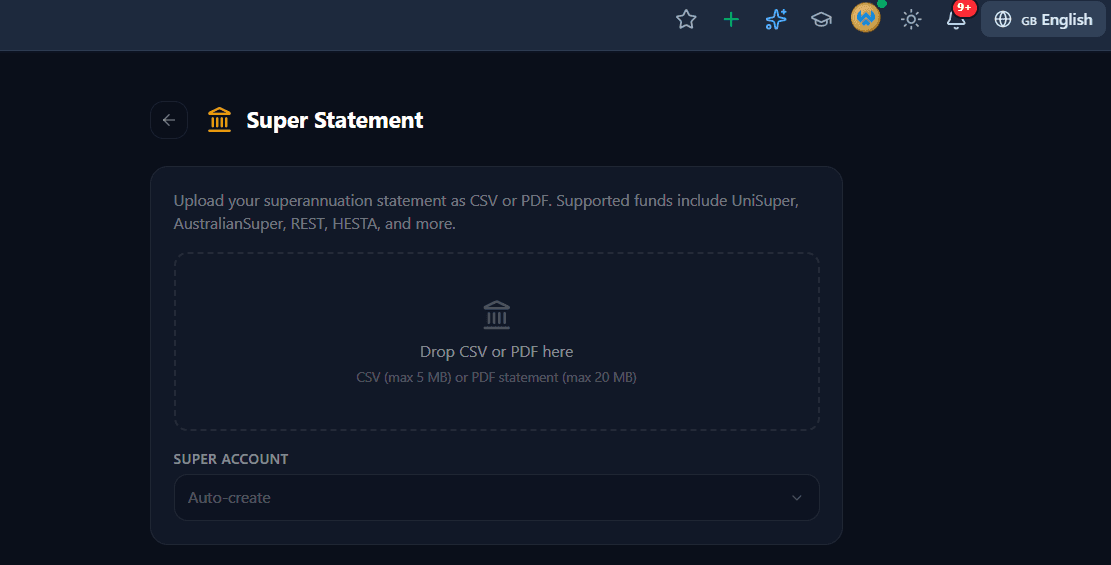
For investment platforms that don't offer a direct connection, this is how your portfolio stays current. Forward each contract note and the trade is recorded for you, with no typing.
You stay in control of what's added
Automation is only useful if you can trust what it creates. So Wealthra doesn't add records it isn't sure about.
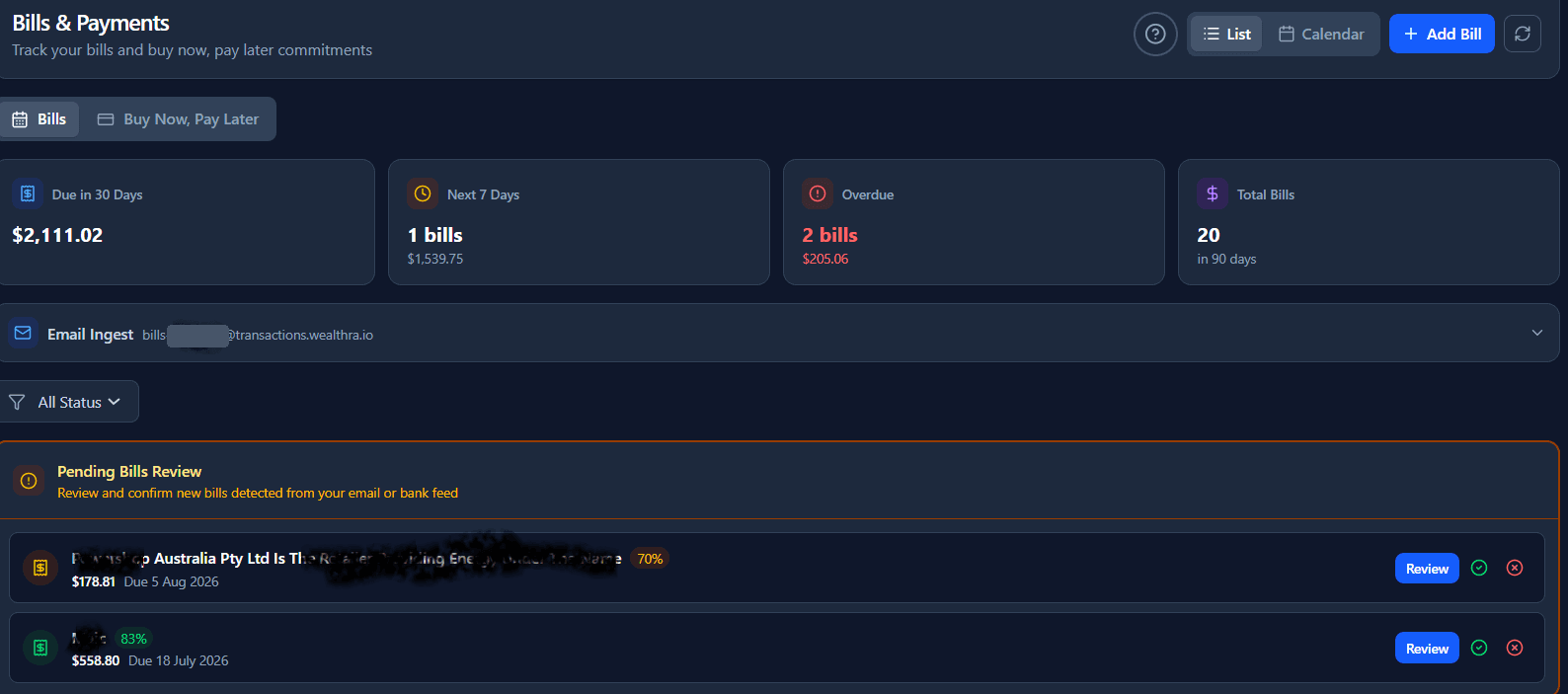
Each detail it reads from a bill (biller, amount, due date, account number) gets its own confidence score. The score shows as a percentage next to each bill. If anything is uncertain, the bill goes into the Pending Bills Review queue. You check it, fix anything that's wrong, then confirm or dismiss it. New bills Wealthra spots in your bank feed land in the same queue, so every new bill is confirmed in one place. Only then does it become a recurring bill that Wealthra matches against your bank transactions.
Receipts that find their transaction
Receipts you add sit in your receipt store until they're linked to a bank transaction. Wealthra suggests matches by looking for a transaction with the same amount within seven days of the receipt date. When it makes a match, it lets you know. On the Documents page, tick Unmatched only to see the receipts still waiting for a transaction.
The result is a transaction list where the card payment of $1,249 at an appliance store opens to show exactly which fridge it was. That's useful for warranty claims, returns, and for anyone who shares finances and wants to know what a purchase was.
This builds on the way Wealthra already categorises every transaction from day one. See how expense coding works.
Ask the Money Coach about a document Budgeter, Investor, Planner
Take a photo of a receipt, bank statement, payslip or invoice and share it with the AI Money Coach. It reads the document and tells you:
- what kind of document it is
- the key details: date, merchant or employer, amounts and line items
- a suggested income or expense category
- tags such as #tax, #business or #medical
- a flag for items to include in your tax deduction review
Because it happens in the chat, you can keep asking about the same document. For example: “How much of that was GST?” or “Which of these line items were for work?”
Attach documents to anything
Documents aren't just for receipts. You can attach a file to almost anything in Wealthra:
- Transactions: the receipt or invoice behind a payment
- Accounts: statements, loan contracts and account letters
- Bills: the original bill PDF, kept with the recurring bill
- Assets: purchase receipts, valuations and photos of the item
- Buy now pay later purchases: the order confirmation and repayment schedule. See BNPL tracking
- Project budgets: quotes and invoices for a renovation or other project
Find any document in seconds
Wealthra reads the text inside every attachment, including scanned PDFs and phone photos. Search covers the file name, the name you gave it, your description and the words inside the document itself.
Search “dishwasher” and you'll find the receipt, even if the file is called IMG_4021.jpg.
Less paper to keep
Many Australians keep a shoebox or folder of paper records “just in case”. The ATO accepts digital copies of records as long as they're a true and clear copy of the original. See the ATO's guidance on keeping records.
With documents stored in Wealthra, your financial paper trail is archived in one place and linked to the numbers it supports. Document storage is included on every paid plan: 1 GB on Budgeter and 49 GB on Investor and Planner. Compare plans.
Private by design
- Only you can see your documents. Every file is stored securely and linked to your account alone.
- Your forwarding addresses can't be guessed. They're built from random identifiers, not your name or a number someone could work out.
- Files are checked on the way in. Wealthra checks each file's type and size before accepting it.
Common questions
What kinds of documents can I store in Wealthra?
Receipts, bills, invoices, payslips, bank statements, superannuation statements, broker contract notes, buy now pay later confirmations, and photos or records for assets you own. PDFs and photos (JPEG, PNG, WebP and GIF) are supported, and super statements can also be uploaded as CSV files.
How does forwarding an email to Wealthra work?
Each Wealthra user gets private forwarding addresses for different document types, such as bills, receipts, super statements and broker contract notes, plus one for each investment portfolio. You’ll find them in the Documents menu. Forward an email to the matching address and Wealthra reads the attachment and files it. Every forwarded email is also kept in your Wealthra inbox, so nothing is lost if a document can’t be read automatically.
Will Wealthra create bills or transactions without asking me?
Not when it isn’t sure. Each detail Wealthra reads from a bill gets a confidence score. If any detail is uncertain, the bill goes into a review queue for you to check and confirm before it’s added.
Can I search inside scanned documents and photos?
Yes. Wealthra reads the text in every attachment, including scanned PDFs and photos, so a search covers the file name, your description and the words inside the document.
Which plans include document storage?
Every paid plan. Budgeter includes 1 GB of document storage, and Investor and Planner include 49 GB. Photo capture works in the Wealthra app on iOS and Android. Compare plans.
Is Wealthra tax deductible?
It may be. The ATO doesn’t address personal finance apps specifically, but its guidance for share investors says you may be able to claim subscriptions you use to manage your portfolio, and other costs directly related to maintaining it. Only the part you use for managing your investments can be claimed, not any private use. Whether you can claim Wealthra, and how much, depends on your circumstances, so seek advice from a registered tax agent or accountant before you claim it. See the ATO’s guidance on dividend income deductions.
Who can see my documents?
Only you. Documents are stored securely and linked to your account, and your forwarding addresses are random, so they can’t be guessed.
New to Wealthra?
See your accounts, super, investments and the paperwork behind them in one place. Every plan includes a 14-day trial with bank connections. No card needed.
Try Wealthra freeAlready using Wealthra? Open the app.
More from Wealthra
This post explains how document features in the Wealthra app work. It is information only, not a recommendation about what you should do.
Important: The information provided is factual and general educational information only. It is not financial, investment, tax or legal advice and must not be relied on as such. Wealthra Pty Ltd does not hold an Australian Financial Services Licence (AFSL) and does not provide financial product advice. This information does not take into account your personal objectives, financial situation or needs. Before making any financial decision, consider whether it is appropriate for your circumstances and seek advice from a licensed financial adviser, accountant or other qualified professional.