
How to see all your Australian bank accounts in one app (2026)
Shane Bomford, CA · Co-founder, Wealthra ·
To see all your Australian bank accounts in one place, you connect each bank to a personal finance app through Open Banking, the banking part of the Consumer Data Right. You approve the connection inside each bank’s own login, the app gets read-only access, and balances and transactions from every bank appear together. Wealthra, Frollo, PocketSmith and WeMoney all do this. They differ in how they connect, what else they track and what they cost.
This guide explains how account connections generally work in Australia and how some apps describe their own services. It is information only, not a recommendation about which app you should use.
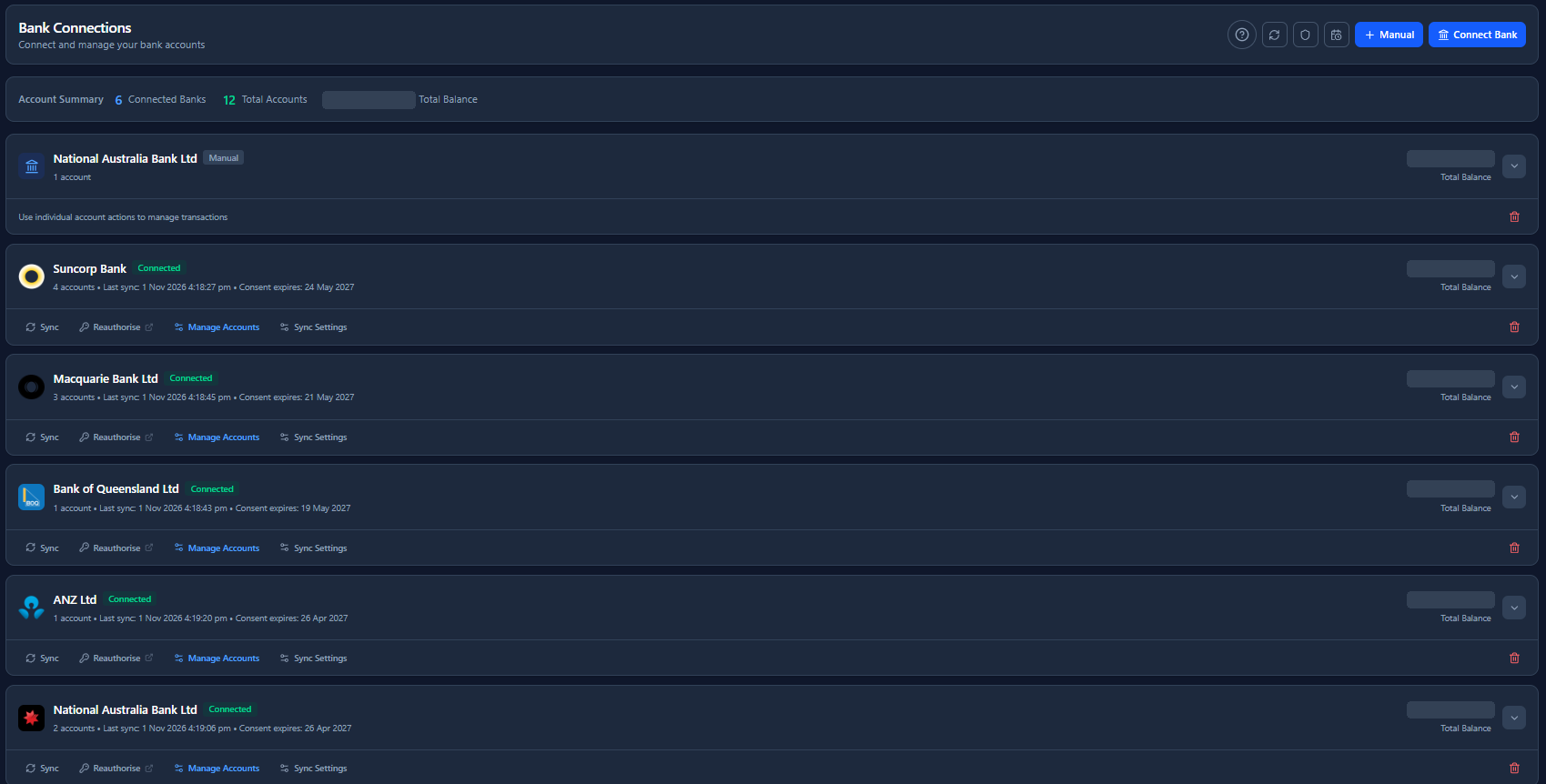
Why your bank’s app only shows part of the picture
Your banking app is built around the accounts you hold with that bank. Many now include spending insights, but they’re mostly based on that bank’s own accounts. If your pay lands at one bank, your credit card is with another and your home loan sits with a third, no single banking app shows the lot.
That’s common. Australians often keep an everyday account, a high-interest savings account, a credit card and a mortgage with different institutions, each with its own login. A personal finance app brings them into one view, so you can see total balances, spending across every account and what you owe, without logging in to each bank in turn.
Two ways apps connect to your banks
Apps connect bank accounts in one of two ways. It’s worth knowing which one an app uses before you link anything.
You’re sent to your bank, log in there, and choose which accounts to share and for how long. The app never sees your banking password. Access is read-only, regulated under the CDR, and lasts up to 12 months before you’re asked again.
You enter your banking username and password into the app or its data partner, which logs in on your behalf to collect your data. It’s still legal in Australia and some apps use it where Open Banking isn’t available.
The difference matters for more than convenience. The ACCC has noted that handing your banking login to a third party can reduce the protections you’d otherwise have under the ePayments Code if you suffer a loss from an unauthorised transaction (ACCC submission to Treasury). Open Banking was designed so that you don’t have to share your password at all. For a fuller explanation, see how Open Banking and the CDR work.
You stay in control of every connection
With Open Banking, the connection belongs to you, not the app. Three things keep it that way:
- Your bank confirms it with you directly. The connection is authorised with your bank, not with the app. Your bank checks it’s really you, usually with a one-time code it sends you, and asks you to confirm which accounts to share. Once it’s set up, the connection appears in your bank’s own data-sharing dashboard, separately from the app.
- You can revoke it at any time. Stop sharing whenever you like, either in the app or in your bank’s dashboard. You don’t need the app’s permission, and the app can’t keep collecting your data after you withdraw consent. In Wealthra, your data is deleted within 30 days of revoking access.
- You re-authorise it at least every 12 months. Under the Consumer Data Right rules, an individual’s consent to share banking data lasts no more than 12 months. To keep a connection running after that, you have to approve it again. If you don’t, sharing stops.
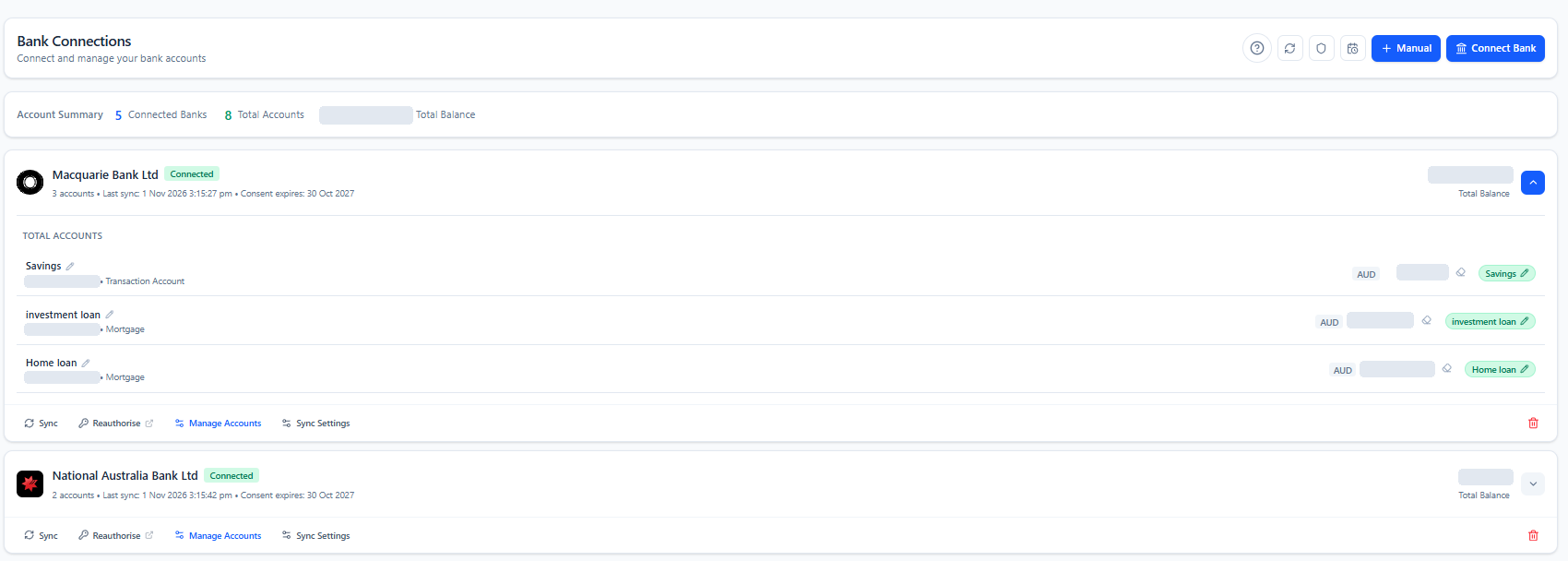
What Open Banking covers, and what it doesn’t
Under the banking CDR, you can share data from the products most people think of as their bank accounts:
- transaction and savings accounts, and term deposits
- credit cards
- home loans, including offset accounts held with the lender, and personal loans
Some things sit outside it. Superannuation funds, share brokers, crypto exchanges and most buy now pay later providers aren’t part of the banking Consumer Data Right today. Apps that show these use other methods: statement uploads, statements forwarded by email, data partners, direct exchange connections, or entries you add yourself. If you want super, shares or BNPL in the same view as your bank accounts, check how each app handles them.
How four Australian apps connect your accounts
The table shows how each provider describes its account connections on its own website. We checked each one on 1 November 2026. If something has changed, tell us and we’ll update it.
| App | How it connects Australian banks | Other connection methods | Free option | Also brings in |
|---|---|---|---|---|
| Wealthra | Open Banking (CDR) via Basiq, an accredited data recipient | Not offered for banks | Free plan with a 14-day trial of bank connections, then up to 3 manual accounts. Paid plans from $99 a year | Investments, super, crypto exchange sync, BNPL, property, documents; trusts, companies and SMSFs on Planner |
| Frollo | Open Banking (CDR); Frollo is itself an accredited data recipient | Screen scraping where a provider isn’t yet available on Open Banking | Free app | Loans, super and investment accounts |
| PocketSmith | Open Banking via Basiq, plus traditional bank feeds; says it has live feeds for 163 Australian institutions | Traditional feeds; overseas banks; Sharesight link for investments; file imports | Free plan; paid plans limit connected banks (6 on Foundation, 18 on Flourish, unlimited on Fortune) | Investments via Sharesight and data connections; other assets added manually; multi-currency |
| WeMoney | Open Banking (CDR) with major banks, through Yodlee Envestnet and Mastercard Finicity | Credential-based connections through Yodlee for selected institutions | Free app | Credit cards, loans and super |
- “Free option” describes what each provider says on its own site. Features on free plans and the number of accounts you can connect vary, so check the current plan details before you sign up.
- Sources, checked 1 November 2026: Frollo app · Frollo on the App Store · PocketSmith Australia · PocketSmith plans · WeMoney supported institutions · WeMoney security · Wealthra pricing · Wealthra supported banks
For a wider comparison that includes budgeting, forecasting and investment tracking, see personal finance apps in Australia compared, or the one-to-one comparisons for Frollo, PocketSmith and WeMoney.
Six questions to ask before you connect your banks
- Does it ask for my banking password? An Open Banking connection sends you to your bank to approve sharing. If an app asks you to type your banking login into it, that’s a credential-based connection.
- Who is the accredited party? Every Open Banking connection runs through an accredited data recipient, either the app itself or a partner it works under. You can look them up on the official CDR provider register.
- Are my banks supported? Check the app’s list for each of your banks, including smaller banks and credit unions, before you sign up.
- How much history comes across? Some apps bring in months or years of past transactions on connection; others start from the day you connect.
- What happens after a free trial? Check whether bank connections stay on, switch off or are limited once a trial ends.
- How do I stop sharing? You can withdraw Open Banking consent at any time. Check that the app shows your consents clearly and explains what happens to your data when you leave.
For a broader checklist, see how to choose a safe, trusted personal finance product.
How it works in Wealthra
Wealthra connects your banks through Open Banking only. Wealthra Pty Ltd is a CDR Representative of Basiq Pty Ltd, an accredited data recipient (ADRBNK000208). Here’s what connecting looks like:
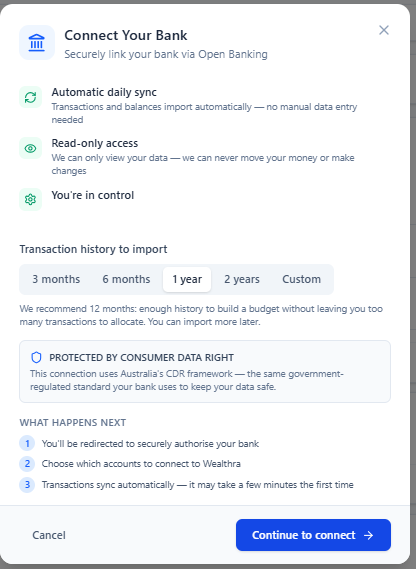
- Start in Bank Connections. Select Connect Bank and choose how much transaction history to bring in, from 3 months to 2 years, or a custom range.
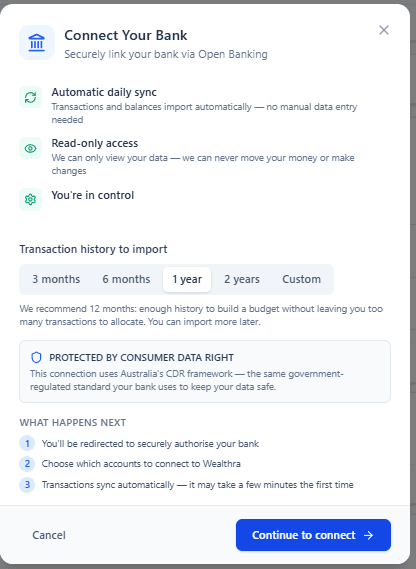
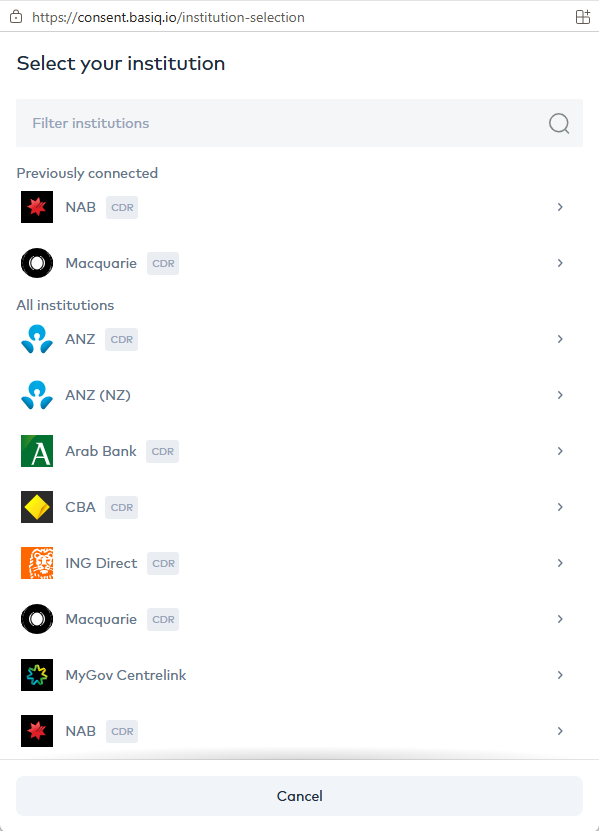
Choose how much history to import before connecting. The outdated deletion wording has been masked: revoking access stops collection, and your data is deleted within 30 days. - Choose your bank on Basiq’s secure consent page. Institutions marked CDR connect through Open Banking.
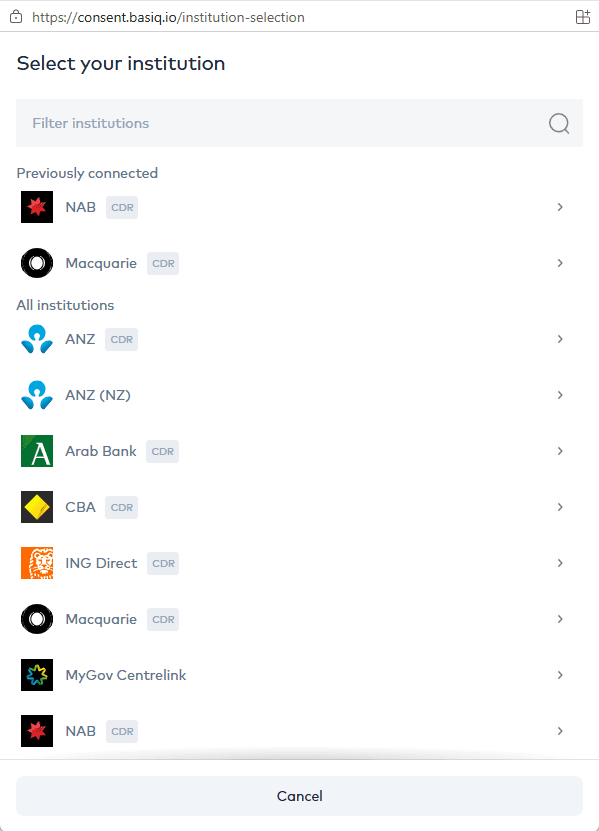
Choosing your bank on Basiq’s consent page. Banks you’ve connected before appear at the top. - Approve it at your bank. You log in on your bank’s own page, confirm which accounts to share and for how long. Wealthra never sees your banking password.
- Your history arrives. The history you chose comes across on connection, and new transactions sync automatically each day.
- Everything is coded for you. Transactions are categorised from the first sync, including transfers between your own accounts, credit card payments and mortgage repayments split into interest and principal. Your own rules always apply first. How auto-coding works
- Repeat for each bank. Every connection’s status, last sync and consent expiry date sit together in Bank Connections, with a Reauthorise link when renewal is due.
Beyond your bank accounts
With your banks connected, Wealthra’s Investor and Planner plans add the rest of your financial life to the same view, so your net worth reflects everything, not just your bank balances:
- Super: upload a statement, forward statements to your own Wealthra email address, or import a CSV.
- Shares, ETFs and managed funds: ASX and international holdings, with crypto synced from Coinbase, Swyftx, CoinSpot and BTC Markets.
- Buy now pay later: Afterpay, Zip and other BNPL plans sit beside your bills. BNPL tracking
- Property and other assets: add your home or an investment property so your net worth includes them.
Common questions
- Can I see all my Australian bank accounts in one app?
- Yes. Personal finance apps such as Wealthra, Frollo, PocketSmith and WeMoney can connect accounts from multiple Australian banks and show their balances and transactions together. Most connect through Open Banking (the Consumer Data Right), where you approve read-only access inside each bank’s own login.
- Can an Open Banking app move money out of my account?
- No. In banking, a Consumer Data Right connection shares data only. The app can read balances and transactions, but it can’t make payments or transfers.
- How long does an Open Banking connection last?
- For individuals, consent to share banking data lasts up to 12 months. You can withdraw it earlier at any time, either in the app or in your bank’s data-sharing dashboard. When consent ends, the app has to ask you again to keep the connection going.
- Do I have to give a finance app my banking password?
- Not with an Open Banking connection. You’re sent to your bank to log in and approve the sharing, so the app never sees your banking password. Some apps also offer credential-based connections, where you enter your banking login into the app or its data partner. Sharing your login can affect your protections under the ePayments Code if an unauthorised transaction happens, so check how an app connects before you link an account.
- Can one app show my super and shares as well as my bank accounts?
- Often, yes, but not through Open Banking. Super funds, share brokers and crypto exchanges sit outside the banking Consumer Data Right, so apps use other methods such as statement uploads, emailed statements, data partners or exchange connections. On Wealthra’s Investor and Planner plans, super and investments sit alongside your bank accounts in your net worth.
- Is there a free way to see all my bank accounts in one place?
- Yes. Frollo describes its app as free, and WeMoney and PocketSmith both have free options. Wealthra’s free plan includes a 14-day trial with bank connections; after that, the free plan keeps up to 3 manual accounts, and automatic bank feeds are part of the paid plans.
- Which banks can Wealthra connect to?
- Wealthra connects through Open Banking via Basiq, an accredited data recipient. The current list of institutions, including major, regional, customer-owned and digital banks and non-bank lenders, is on Wealthra’s supported banks page. See supported banks.
Bring every account together, then see your whole financial position. Connect your banks free for 14 days. No credit card required. Start your free trial →
Check your banks first on the supported banks list.